Salesforce for Hospitality: How Connected Guest Journeys Win in 2026
 Target Everest |
 In hospitality, the guest journey no longer starts at check-in and ends at check-out. It begins with a search or a social post, moves through booking engines and OTAs, and continues across emails, WhatsApp, apps, front-desk conversations and online reviews.
At the same time, hotels and tourism brands face tighter margins, staffing challenges and guests who expect both high-touch service and frictionless digital. Recent hospitality reports highlight the same forces shaping 2025-2026: AI-powered personalisation, contactless journeys, sustainability and wellness-driven stays.
This is where Salesforce for hospitality stops being “just a CRM” and becomes the platform for orchestrating the full guest journey. Salesforce itself describes its hospitality CRM as a way to unify data, connect teams and leverage AI to transform guest experiences.
1. Beyond bookings: why hospitality needs a connected CRM
Most hospitality businesses already run a PMS, a booking engine and several point solutions. The real problem is what sits between them:
- Marketing does not see full stay and spend history.
- Sales works in spreadsheets for groups and corporate.
- Operations only see guest sentiment when a complaint escalates.
Specialist partners working with Salesforce in hospitality consistently point to the same issues: fragmented systems, duplicated data and manual work across sales, reservations and guest relations.
A hospitality CRM does not replace PMS or revenue management. It sits above them as a guest-centric layer:
- One place to see bookings, preferences, loyalty, enquiries and cases.
- One set of processes for sales, marketing, operations and service.
- One platform where automation and AI can safely act on trusted data.
2. How Salesforce transforms the guest journey
Personalised marketing and direct bookings
With Salesforce Marketing Cloud, hospitality brands move from generic blasts to journeys grounded in real data:
- Segment guests by purpose of travel, value, channel preference and stay patterns.
- Trigger pre-stay flows with dynamic content for business, family, leisure or event stays.
- Offer targeted upsells (late check-out, spa, experiences) based on what guests actually used last time.
- Run win-back journeys when high-value guests go quiet.
Because these journeys sit on top of unified profiles in Salesforce and Data 360, they can respond to real-time events such as cancellations, new reviews or loyalty status changes.
Service and feedback on one platform
With Service Cloud, every email, form submission or social message becomes a case with an owner and SLA. Features like email-to-case and AI-assisted replies reduce response times and standardise quality, even with lean teams.
Self-service is handled through Experience Cloud:
- Guests can manage bookings, preferences and requests online.
- Loyalty members can see their benefits, vouchers and history.
- Invoices and documents are accessible without contacting the front desk.
Feedback and complaints no longer disappear into inboxes. They feed into CRM Analytics dashboards where patterns in satisfaction, NPS and issues become visible by property, segment or channel.
Automation and smarter operations
Behind the scenes, Salesforce helps hospitality teams take repetitive work off the table:
- Group and corporate sales: lead capture, proposals, approvals and follow-ups can run through guided processes rather than ad hoc email chains.
- Einstein Activity Capture reduces manual data entry by logging emails and meetings against the right guests or accounts.
- Flows and alerts notify teams about VIP arrivals, high-value cancellations or at-risk corporate accounts in time to act.
Specialist hospitality consultancies working with Salesforce report better pipeline visibility, faster response times and higher upsell revenue once these processes move into CRM.
Agentforce: a 24/7 digital concierge
On top of this, Agentforce can act as a 24/7 digital concierge with a 360-degree view of each guest. Grounded in centralised Customer 360 and Data 360 data, it understands the guest’s profile, preferences and history, and can tailor conversations, recommendations and actions in real time across channels.
3. Sustainability, AI and data-driven decisions
Sustainability has moved from “nice story” to a core decision factor for many guests and investors. Hospitality trend reports for 2025-2026 highlight eco-friendly travel, reduced food waste and smart resource management as key themes.
Salesforce can support this in practical ways:
- Track energy, water and waste metrics alongside revenue and occupancy in CRM Analytics.
- Use guest data to design campaigns around low-impact stays, local partnerships or “green” packages.
- Integrate with AI-driven tools that monitor food waste or resource usage and surface insights directly in Salesforce dashboards.
When sustainability lives in the same data model as guest and commercial metrics, it becomes part of everyday decision-making rather than a separate report.
4. How Target Everest supports hospitality teams
At Target Everest, we work with hospitality and tourism clients who want Salesforce to act as a true guest-journey and operations platform, not just a contact database. Our hospitality work has included end-to-end Salesforce implementations for hotel groups, from sales and reservations to document generation and reporting.
Across these projects, our role is to:
- Map the guest lifecycle and decide which touchpoints should live in Salesforce.
- Integrate PMS, booking engines, channel managers and finance so teams share a single source of truth.
- Configure Sales, Service, Marketing and Experience Cloud to fit real operations, not just ideal diagrams.
- Introduce automation and AI with clear governance, so teams feel supported, not replaced.
The outcome we aim for is simple:
- Guests experience coherent, personalised journeys.
- Teams gain clarity and time, rather than another tool to manage.
- Leadership sees data they can trust to make commercial and sustainability decisions.
If you operate in hospitality and want to explore what Salesforce for hospitality could look like in your world, from group sales and reservations to guest experience and sustainability, this is the right moment to move from scattered tools to a connected, data-driven guest journey.
From CRM to Agentic Enterprise: Preparing Your Salesforce Strategy for 2026
 Target Everest |
 Salesforce is entering a new chapter in 2026.
Over this year, three movements will reshape how teams work on the platform:
- The rise of the Agentic Enterprise, led by Agentforce 360.
- Data 360 as the strategic data layer for AI and agents, evolving from Data Cloud.
- Slack positioned as an agentic OS, the workspace where people, data and AI agents meet.
In parallel, the EU AI Act moves from theory to enforcement, with high-risk AI systems expected to be compliant by 2 August 2026.
For many organisations, this mix of opportunity and regulation feels exciting and slightly uncomfortable. The goal of this article is simple: show what is really changing, where Agentforce fits in your business, and how to move forward with structure.
1. What is really changing in 2026?
Salesforce’s message is clear: AI does not replace people. It elevates them, through agents that understand goals, call the right tools and act across systems.
Three pillars support this vision:
- Agentforce & Agentforce 360
The platform to design, deploy and monitor AI agents across Sales, Service, Marketing and custom apps, all grounded in Salesforce data and security.
- Data 360 as the foundation
Salesforce has formally rebranded Data Cloud to Data 360, emphasising a unified, AI-ready view of customers across channels and systems.
- Slack as the agentic workspace
Slack is being reframed as your “agentic OS”: a place where channel-based experts, a rebuilt Slackbot and Enterprise Search connect conversations, data and agents.
On the regulatory side, guidance from the European Parliament and analysis from organisations such as Trilateral Research confirm a phased EU AI Act timeline: prohibited practices from 2025, rules for general-purpose AI in 2025, and full obligations for high-risk systems from August 2026.
Put together, 2026 is not “just another release”. It is a shift from static processes to human + agent collaboration, under clearer expectations of transparency, risk management and human oversight.
2. Why many Salesforce teams feel unprepared
Across Salesforce, IT and business leaders, the same patterns keep appearing:
- Fragmented data
Information is spread across multiple orgs, legacy tools and spreadsheets. Agents cannot make good decisions without a complete, consistent view.
- Brittle processes
Years of urgent requirements have produced flows, triggers and workarounds that nobody fully owns. Letting agents act on top of this feels risky.
- AI as a side project
There are pilots in sales or service, but no shared architecture or risk model. Wins are hard to scale; failures are hard to learn from.
- Regulation that feels abstract
The EU AI Act is on the radar, but it is not yet mapped to concrete use cases in Salesforce, Slack or Agentforce.
The result: impressive demos, but a daily reality still dominated by manual work and exports.
3. Where Agentforce fits in your business
To make this tangible, it helps to look at practical Agentforce scenarios – some internal, some customer-facing.
3.1 Agentforce for internal teams
Sales – Opportunity Assistant (Sales Cloud)
- Reviews open opportunities (stage, history, activities, emails).
- Flags risks such as stalled deals or missing decision-makers.
- Suggests next best actions directly in the opportunity or via Slack.
Example:
“This opportunity has been in Proposal for 14 days without a reply. Suggest following up with decision-maker X and attaching document Y.”
Value: fewer forgotten deals, better forecasts, higher win rates.
Finance – Contract Validation (Sales + Service + Data 360)
- Reads contracts in PDFs, attachments and email chains.
- Checks terms, penalties and amounts against your standards.
- Alerts finance or legal when something is outside the norm.
Example:
“Contract with customer ABC has a 36-month term instead of the standard 24. Requires validation.”
Value: reduced contractual risk, less manual review, stronger compliance.
Support – Case Triage (Service Cloud)
- Analyses case descriptions, emails and customer history.
- Classifies type, urgency and impact.
- Routes to the right team or proposes an initial response.
Value: faster response times, fewer reassignments, better agent experience.
3.2 Agentforce for customer experience
Omnichannel Service (Service Cloud + Chat/WhatsApp)
- Handles conversations on chat, WhatsApp or web.
- Uses full customer history to personalise answers.
- Resolves simple requests or hands off to humans with full context.
Value: quicker answers, less friction, consistent experience across channels.
Real-Time Marketing Personalisation (Marketing Cloud + Data 360)
- Reads behaviour (opens, clicks, browsing, purchases).
- Chooses the best message, channel and timing.
- Adjusts journeys in real time.
Example:
Customer ignores several emails → the agent pauses email and recommends WhatsApp or a call.
Value: less noise, more relevance, better conversion.
Behind all this, Agentforce respects Salesforce permissions; actions are logged; and humans stay in control where it matters – a natural fit with EU AI Act principles such as human-in-the-loop and traceability.
4. A practical Salesforce roadmap for 2026
You do not need a perfect architecture to start. You do need a clear sequence:
- Map AI use cases to risk, not just to features
Catalogue where you use or plan to use AI and agents. Classify each use case by business impact and EU AI Act risk tier, especially anything that affects access to services, credit, employment or public decisions.
- Build a focused Data 360 core
Start with the journeys that matter most (for example, lead → opportunity → contract → onboarding → support). Bring those objects and events into Data 360 and align access, masking and retention with your existing Salesforce governance.
- Design agentic workflows with guardrails
Give each agent a clear “job description”: what it can do, which tools it may call, when it must hand off and how its actions are logged.
- Prepare people for Slack as the AI hub
Standardise channel usage, train teams to work with Slack AI features, and involve legal and security early so Slack policies reflect how people actually collaborate.
If you are looking at 2026 and wondering how to move from “CRM with AI features” to a genuine agentic enterprise, this is the moment to set the foundations – with clarity, discipline and a bit of ambition. Let’s talk!
Salesforce AI in 2025: What Actually Matters for Your Organisation
 Target Everest |
 Salesforce has moved fast into AI. Einstein 1, Data Cloud, Agentforce, Slack AI, new releases every few months.
If you are responsible for revenue, operations or technology, it may feel exciting and overwhelming at the same time. Licences are getting more powerful, but your reality may still be dashboards exported to Excel, manual handoffs and AI pilots that never quite go live.
This article cuts through the noise and focuses on what has really changed in Salesforce, where most organisations get stuck, and how to start unlocking value in a realistic way.
1. Salesforce is now an AI and data platform, not “just CRM”
The biggest shift is strategic. Salesforce is repositioning Customer 360 around Einstein 1 and Data Cloud, so your CRM becomes a real time data and AI platform, not only a system of record.
Data Cloud sits at the centre. It connects data from your Salesforce orgs and from external systems, builds unified customer profiles and makes that context available to AI, analytics and automation. If AI is the brain, Data Cloud is the nervous system.
On top of that, Salesforce has introduced Agentforce. This is an AI helper and agent embedded inside Sales, Service and other clouds. It can summarise records, suggest next actions, generate content and trigger Flows from natural language, without forcing your teams to learn a new tool.
The message is clear. Salesforce is no longer adding AI as a side feature. It is rebuilding the platform around AI and data.
2. Why most organisations are not seeing the value yet
When we talk to leaders, three pain points appear again and again.
Fragmented data
Customer interactions, contracts, product usage and finance data live in different systems, owned by different teams. AI cannot make good decisions if it does not see the full picture or if basic fields are incomplete and inconsistent.
Complex, fragile processes
Years of urgent requirements have created layers of flows, rules and workarounds. Nobody feels comfortable touching them. New AI features are dropped on top of this, which makes everything feel more unpredictable instead of more intelligent.
Lack of AI governance
Everyone wants automation. Nobody wants a compliance issue or a bad customer experience. If there are no agreed guardrails, legal and security teams slow things down, often for good reasons, and AI projects stay in pilot mode.
The result is a familiar pattern. The organisation pays for powerful Salesforce capabilities, but day to day, teams still rely on manual work and side spreadsheets.
3. What to focus on now
You do not need to implement every new feature to benefit from this new Salesforce wave. You need a sequence.
Start with the data that matters most
Pick one or two high-value slices of data, such as customer profiles and recent interactions, and focus on making them clean, connected and available in Data Cloud. The goal is not perfection. The goal is an initial, trusted foundation that AI can use.
Choose a small number of focused AI use cases
Instead of “doing AI everywhere”, pick one or two scenarios with clear outcomes. For example, inbound lead qualification, first-line support for a defined set of cases, or an internal knowledge assistant for your sales or service team. Design them so that humans stay in the loop, especially at the start.
Design governance from day one
Agree what AI agents can and cannot do. Decide where a human must approve actions, what is logged, and how issues will be reviewed. This makes legal and security part of the solution, not blockers at the end.
Invest in people, not only in licences
AI features will keep evolving. Your real advantage is people who know how to work with them. Train admins, architects and business owners on how to design prompts, flows and guardrails. Help users understand when to trust AI, when to question it and how to give feedback.
4. How Target Everest fits into this picture
If you have not come across us before, we are a specialist consultancy that works at the intersection of Salesforce architecture, data, AI and strategy. We focus on turning platforms into performance, not just technology into licences.
In practice, that means we help organisations:
- Analyse their current Salesforce landscape and identify where data and processes block AI.
- Design an architecture that makes sensible use of Einstein 1, Data Cloud, Agentforce and Slack AI, without over-complicating things.
- Prioritise a small number of AI use cases that map directly to revenue, service or efficiency outcomes.
- Run safe pilots and then scale what works, with governance and change management built in.
The outcome is simple. Fewer disconnected pilots. More visible value, faster, from the Salesforce investments you already have and the AI capabilities that are arriving.
If you recognise these pain points and would like to explore what an AI-ready Salesforce roadmap could look like for your organisation, we are always open to a conversation.
AI Agents vs. Chatbots in Salesforce: Which One is Right for Your Business?
 Target Everest |
 In an increasingly digital world, businesses are leveraging AI-driven solutions to enhance customer engagement, streamline operations, and boost efficiency. Within Salesforce, two of the most widely used automation tools for customer interactions are Chatbots and AI Agents.
While both solutions aim to automate conversations and improve response times, they have fundamental differences in terms of capabilities, adaptability, and long-term value. Understanding these differences is crucial for businesses looking to implement the right solution for customer service, sales, and overall digital transformation.
Chatbots: Efficient but Limited
Traditional chatbots function based on predefined rules and structured workflows. They are designed to follow scripts and automate repetitive tasks, making them particularly useful for:
- Answering FAQs – Providing quick responses to common customer questions.
- Tracking Orders – Allowing customers to check order status in real time.
- Scheduling Appointments – Automating bookings and reservations efficiently.
- Basic Troubleshooting – Offering step-by-step guidance for standard issues.
By handling these simple yet time-consuming tasks, chatbots help businesses reduce the workload on human agents, ensuring that customer service teams can focus on more complex issues.
However, chatbots have notable limitations:
- They struggle when faced with unexpected or complex queries.
- They lack context awareness, making conversations feel repetitive or robotic.
- They provide static responses, as they do not learn from past interactions.
Since chatbots are entirely dependent on pre-programmed rules, their ability to adapt to unique customer needs is minimal. While they are effective for structured and repetitive interactions, they fall short when deeper engagement and personalised communication are required.
AI Agents: The Next Evolution in Customer Service
AI Agents represent a significant advancement in customer interaction automation, moving beyond the limitations of traditional chatbots. Powered by machine learning (ML) and large language models (LLMs), AI Agents offer a far more intelligent and adaptable solution.
Some of the key benefits of AI Agents include:
- Context Awareness – AI Agents retain memory from past interactions, enabling more personalised and seamless customer experiences.
- Natural Language Processing (NLP) – They understand complex queries, interpret nuances, and generate dynamic responses.
- Multi-Channel Support – AI Agents can function across live chat, voice assistants, email, and messaging apps.
- Continuous Learning – Unlike chatbots, AI Agents improve over time by learning from each interaction.
- Advanced Automation – They integrate deeply with Salesforce, allowing automation of tasks like lead qualification, case resolution, and predictive recommendations.
With AI Agents, businesses can automate customer engagement at scale while maintaining a high level of personalisation and accuracy. Instead of providing generic, scripted responses, AI Agents can understand intent, analyse customer history, and predict future needs – leading to improved customer satisfaction and retention.
Key Differences Between Chatbots and AI Agents
| Feature | Chatbots | AI Agents |
| Task Complexity | Handles simple, structured tasks | Manages complex, multi-step processes |
| Communication Style | Predefined scripts | Conversational and context-aware |
| Learning Ability | No learning, static responses | Self-improving, learns from interactions |
| Integration with Salesforce | Basic automation | Deep integration for predictive automation |
| Personalisation | Limited | Highly personalised, intelligent interactions |
For companies seeking more than just basic automation, AI Agents provide a scalable, intelligent, and future-proof alternative.
Does It Still Make Sense to Invest in Traditional Chatbots?
With AI-powered solutions evolving rapidly, traditional chatbots are becoming less attractive for businesses that require dynamic and adaptive automation. However, in some cases, they may still serve a purpose, particularly for:
- Small businesses with budget constraints – Chatbots offer a lower-cost entry point into automation.
- Companies with limited automation needs – Businesses that only require basic customer support functions may find chatbots sufficient.
- Highly structured customer interactions – If customer inquiries are predictable and repetitive, chatbots may still be a viable option.
That said, the shift towards AI-driven automation is clear. Businesses looking to stay ahead of the competition, improve customer experience, and optimise operations are increasingly investing in AI Agents.
For organisations leveraging Salesforce, AI Agents offer a smarter, more connected, and more efficient approach to automation – seamlessly integrating into existing workflows and enhancing both customer and employee experiences.
Want to learn more about how to set up a chatbot in Salesforce? Check out our step-by-step tutorial here: How to Create a Chatbot with Salesforce
Final Thoughts
If a business only requires basic, rule-based automation, chatbots may still be a practical option. However, for companies aiming to deliver smarter, more personalised, and scalable customer interactions, AI Agents represent the next step in digital transformation.
As a Salesforce Implementation Partner, Target Everest helps businesses implement AI-powered solutions that drive efficiency, automation, and customer satisfaction.
Interested in transforming your customer experience? Get in touch to learn how AI Agents can enhance your Salesforce strategy.
Explore more articles on our blog!
Salesforce Email-to-Case Tutorial
 Target Everest |
 What is Email-to-Case?
- Email-to-Case helps automate customer support by converting received emails from customers into cases and auto-populating fields for quick resolution. Email-to-Case on-demand service manages email traffic outside the network’s firewall and limits messages to 25 MB.
Email-to-Case Key Features and Benefits
- Seamless association of customer responses with original cases, including attachments, streamlining case management.
- Comprehensive case reporting tracks both inbound and outbound emails, providing insights into issue resolution processes.
- Flexible routing addresses enable the creation of multiple email addresses for converting customer emails into case fields.
- Integration with Assignment Rules, Escalation Rules, Workflow Rules, and Auto-Response Rules ensures smooth operation and enhanced efficiency.
Setup Email to Case in Salesforce with Microsoft 365
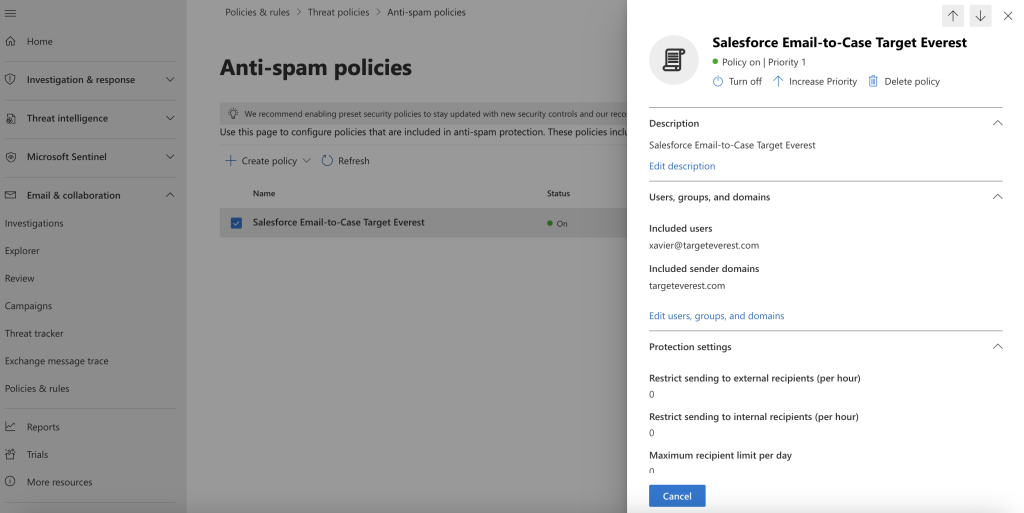
Before anything we have to set a couple policies in Microsoft 365 Admin
- Open the Microsoft Admin
- In Admin Centers Tab, go to Security
- In Email & collaboration tab, go to Policies & rules
- Here go to Threat policies
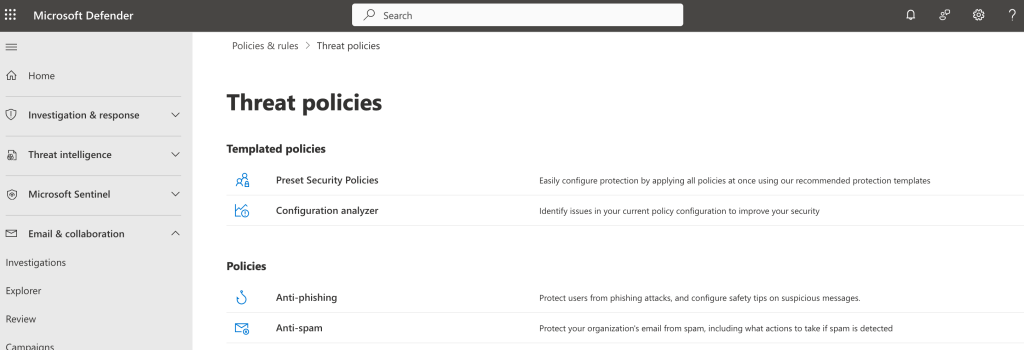
- Then Anti-spam policies
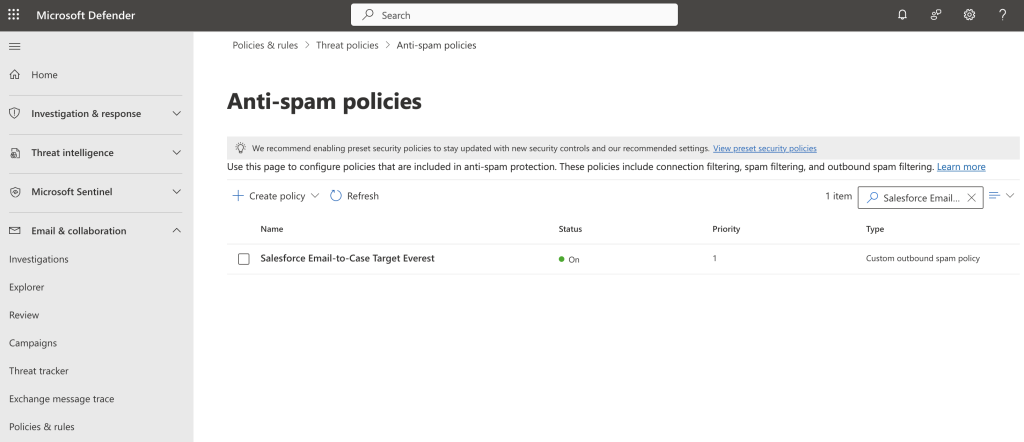
- In here click Create policy > Outbound
- Follow these Steps during Policy creation
- Set policy name accordingly
- Set user, group or domain to include on this policy
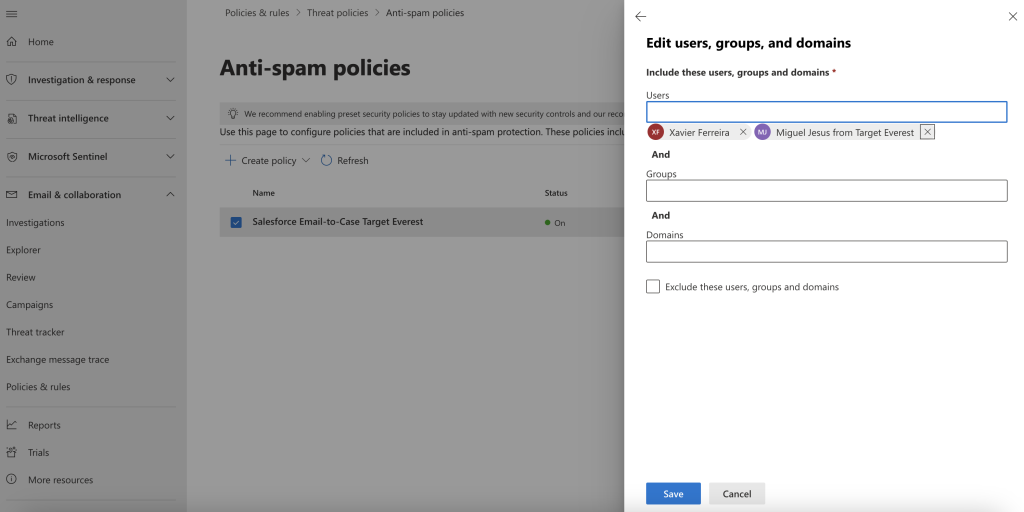
- On the Outbound Protection Settings, set the Automatic Forwarding Rules to “On – Forwarding is enabled
And we are done here!
Back to your Salesforce Environment
1. The first step is to enable Email-to-Case in Salesforce
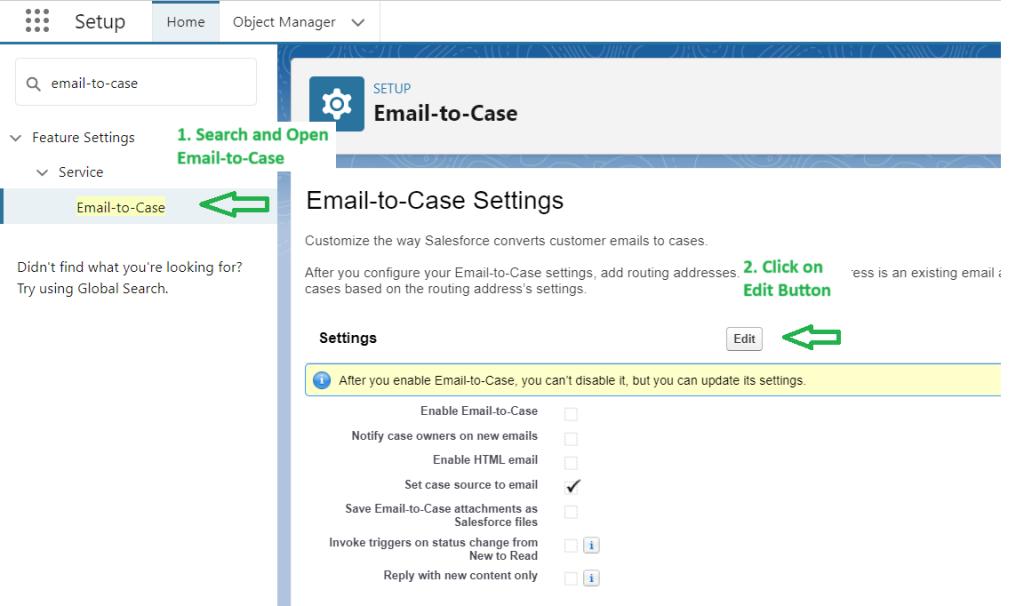
- Go to Setup
- In “Quick find”, search and open “Email-to-Case” and click on the “Edit” Button
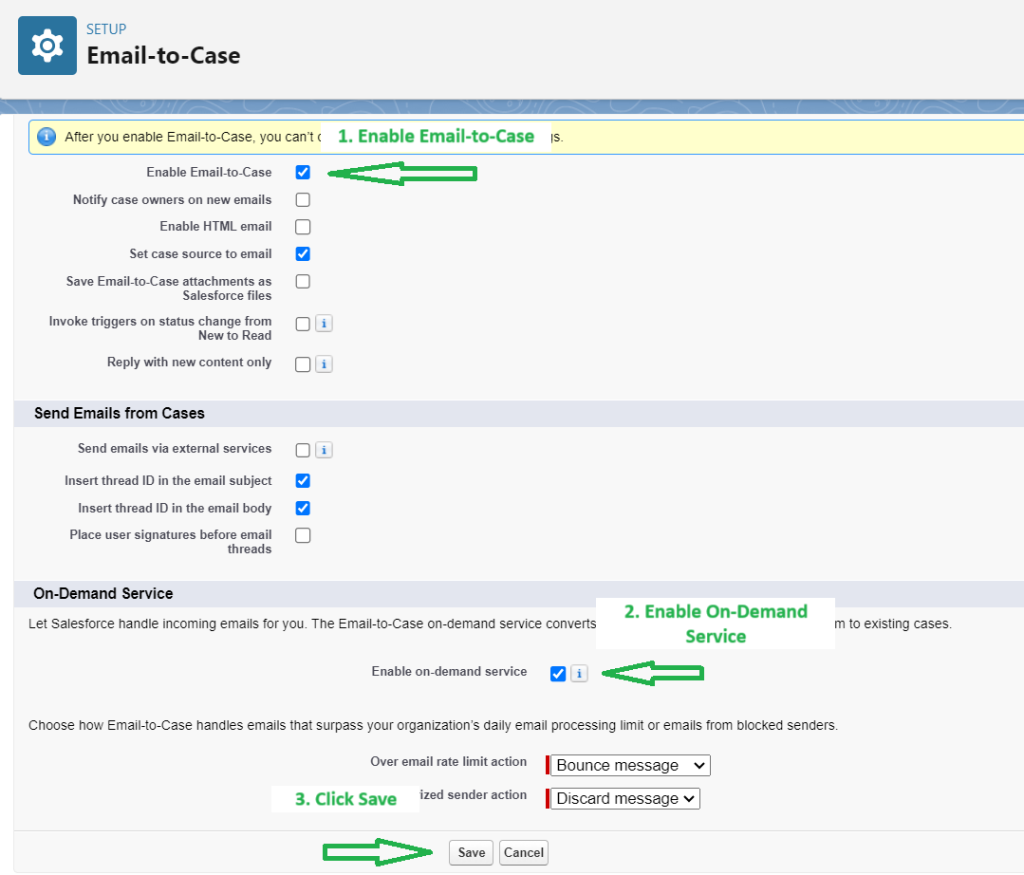
- Select “Enable Email-To-Case” and “On-Demand Service” then click on Save.
2. Next are the Routing Addresses for Email-to-Case
- Click on the “New” button from the Routing Addresses related list (at the bottom of the page)

- Define requirements:
- Set the Routing name for the Email-to-Case. The example used is “Exemplo Email To Case”
- Set the Email Address where the requests will be received. In this example the used email was “[email protected]”
- Check the “Save Email Headers” Checkbox in the Email Settings
- If you are the Owner, Under Case Settings, choose Queue in the Case Owner Dropdownlist and select the corresponding Queue.
If not, just select User in the Dropdownlist and Insert the User - Define the default case priority according to your needs. In this example we defined it as Medium
- Define the case origin. In this example we defined it as Email
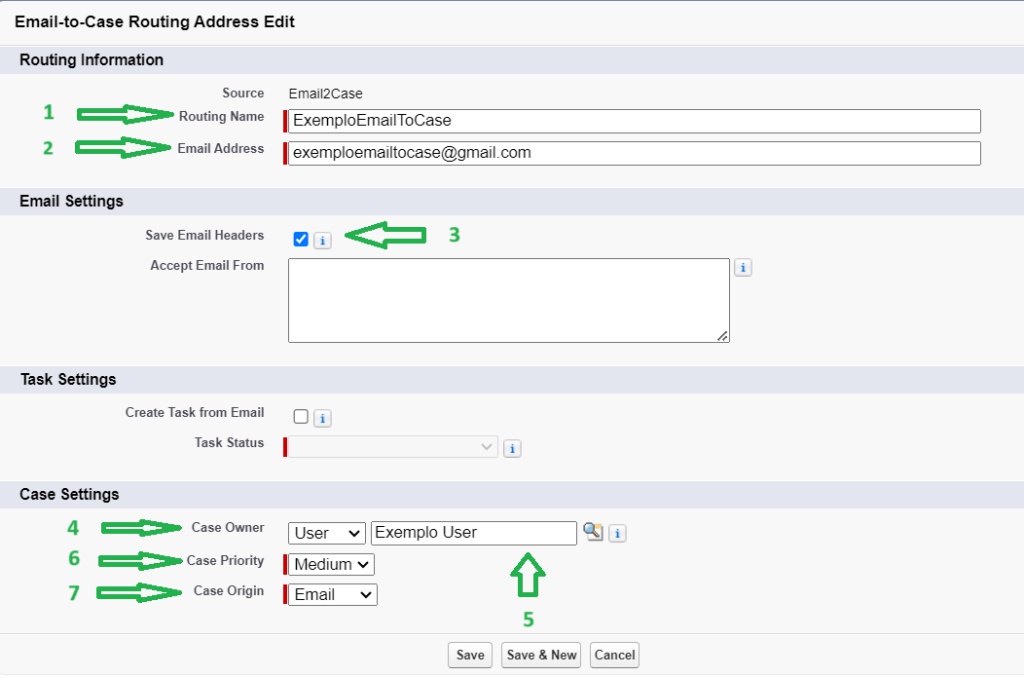
- Click Save
After Finishing, Salesforce will send you an email to your Email Address to verify the email ID
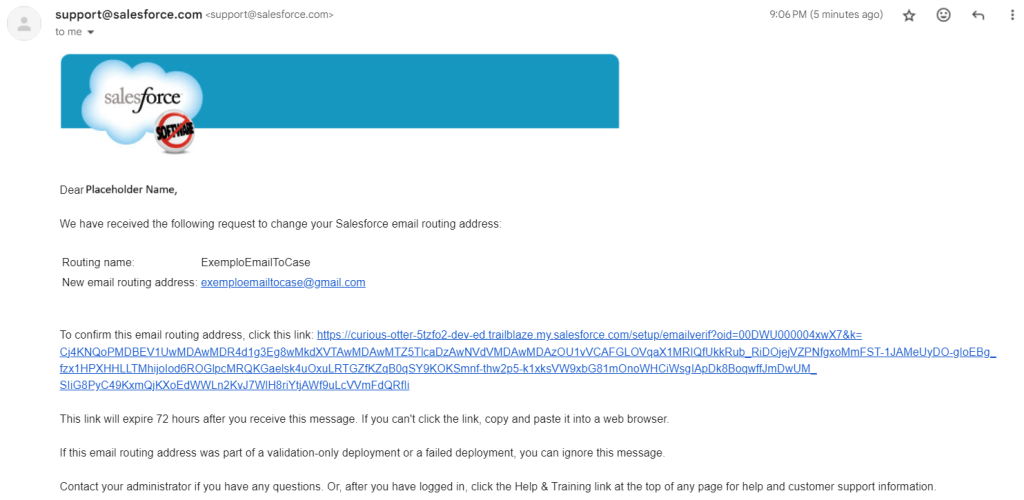
- Salesforce will automatically create an email id for you.
Copy the generated Email Services Address meanwhile.

Setup Routing on the Email Provider
3.1. Setting Up Routing/Forwarding Rules is the next step with Gmail
Now it is time to configure our email forwarding setting at our outlook, Gmail, or email provider.
- Configure your email system to forward messages received at [email protected] to auto-generated service addresses.
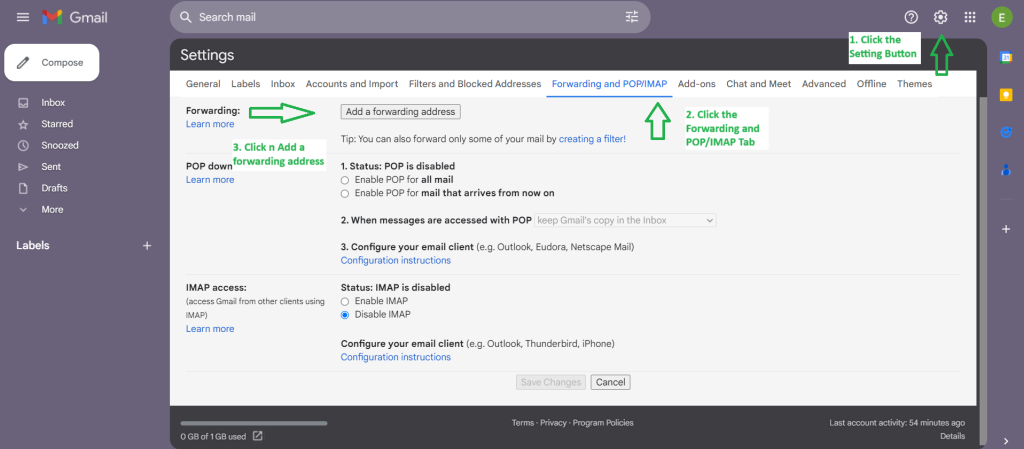
As we are using Gmail for the demo. User Gmail Article for Automatically forward Gmail messages to another account- In your Gmail, click on the settings icon, See all settings.
- Then Click on Forwarding and POP/IMAP tab.
- Then click on the “Add a forwarding address” button.
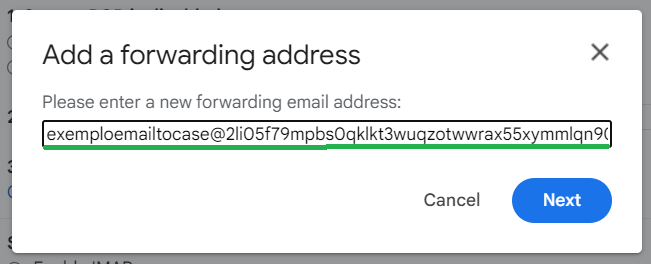
- Add forwarding address as the email provided by Salesforce.
- With the email added, you will now see a Confirmation Screen saying forwarding email to auto-generated Salesforce email-to-case email ID.
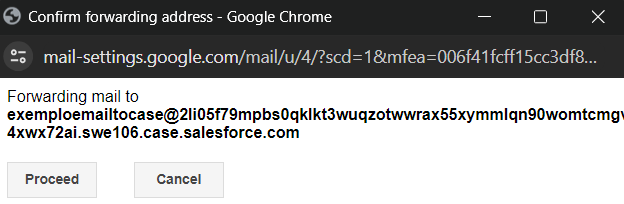
When you proceed, a new case will be created in Salesforce where you will have to open a link to confirm the forwarding email.
- Open the Salesforce case in Services and open the link. This means our email-to-case is working!
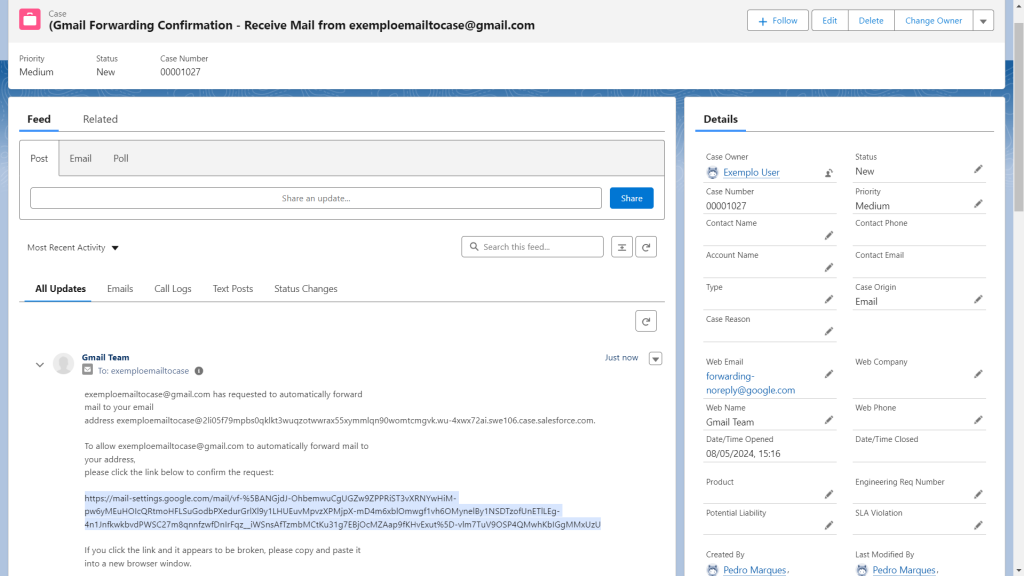
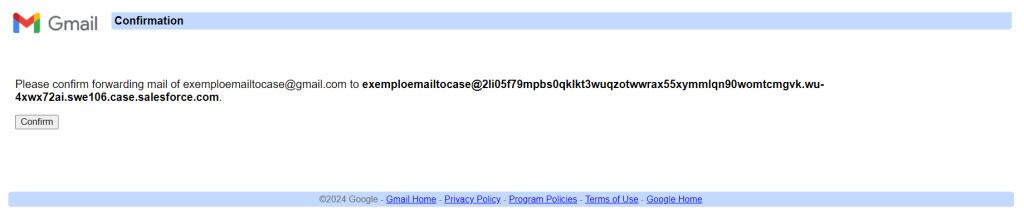
- After opening the link, click the confirm button to ensure the forwarding is set
- With this done, our last step is to go to the Gmail Settings again, and turn the forwarding on for the email we just confirmed, then click Save
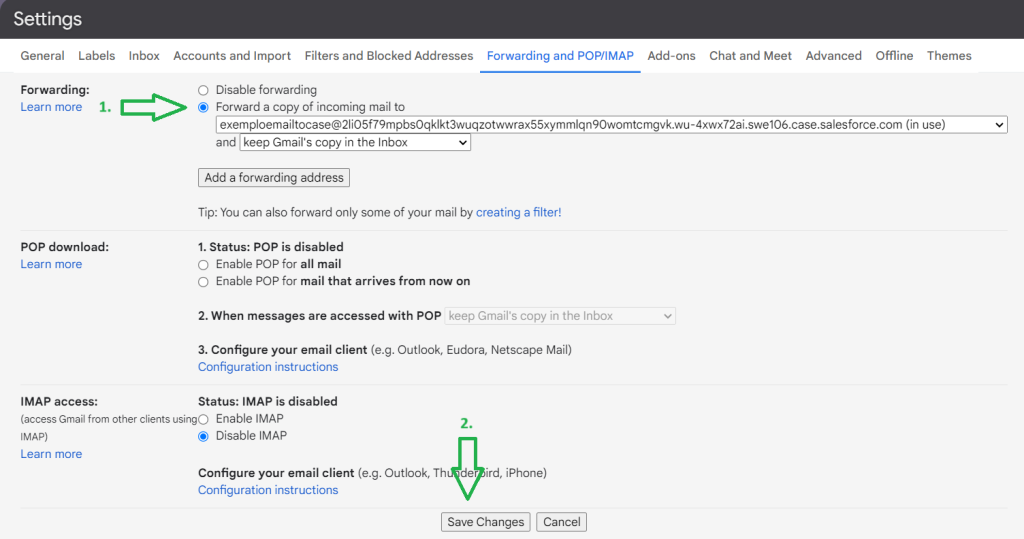
With this, we have concluded the Email-to-Case Setup using Gmail
3.2. Here we will show the steps for Outlook instead of Gmail
- Accept the request from Salesforce (an email is sent after creating and configuring email-to-case in salesforce)
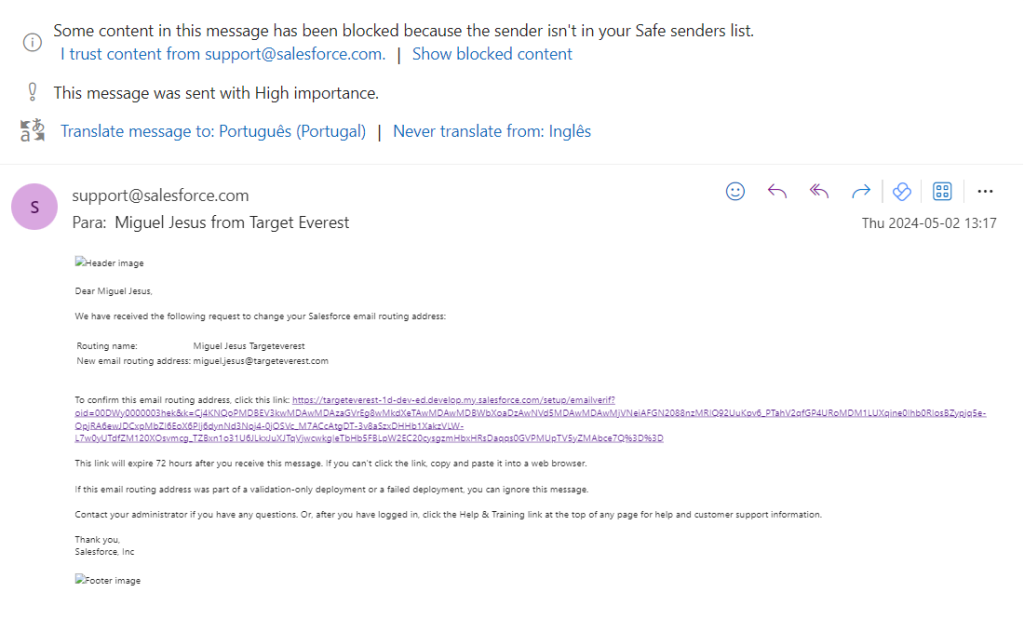
- Now we have to Define the forwarding rule
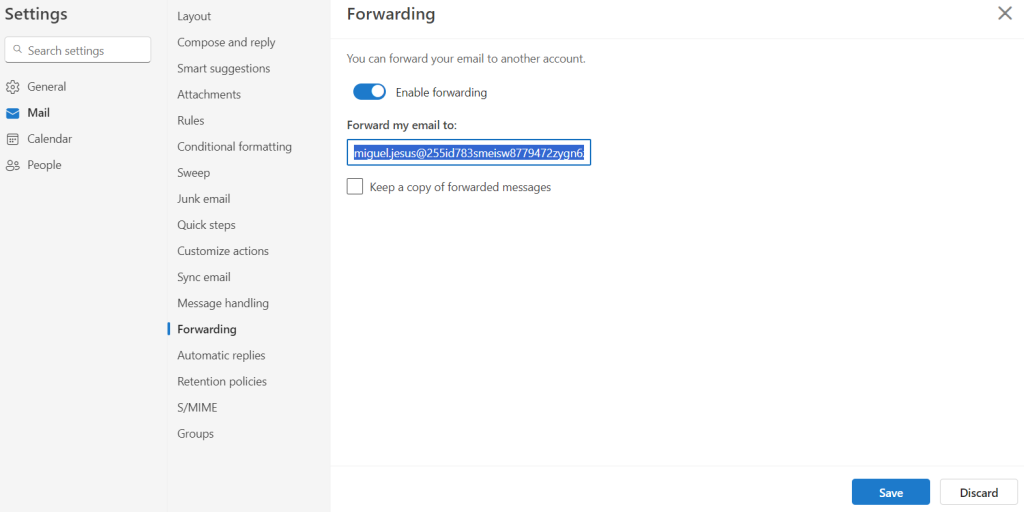
- Define criteria as needed for these configuration
- In action: Choose “Redirect to” and insert previously copied email
- Rule Name: SF Environment – Email-to-case – Account test
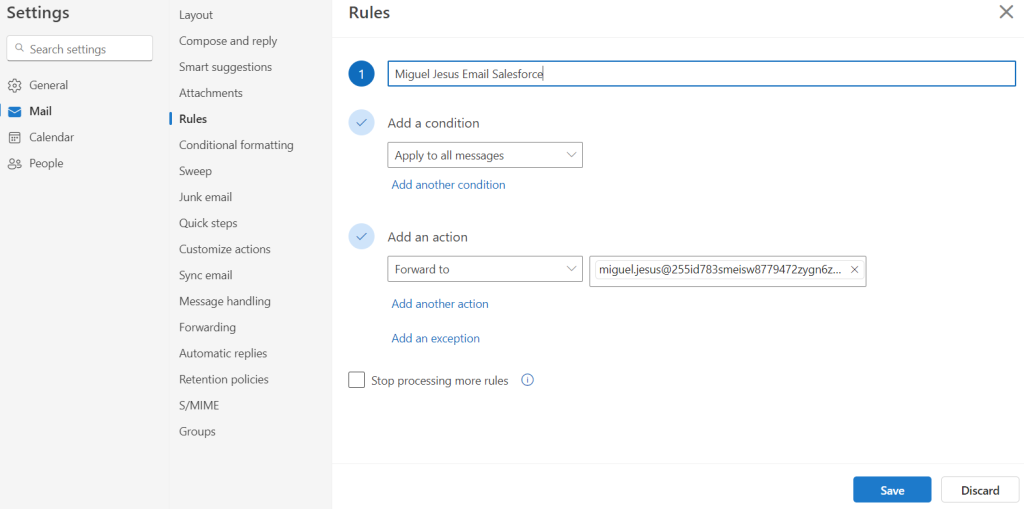
- (Ex: Forwarding Email – Email-to-Case – Account test)
Curious about Salesforce Email-to-Case? Fill out the form, and we’ll contact you shortly with more details!
Explore more articles on our blog!
Target Everest: Your Trusted Partner for Salesforce Solutions
 Marek |
 We are excited to announce the rebranding of our company, Target Everest. With a refreshed image and updated website, we are prepared to navigate the future of Salesforce consulting and assist our clients in unlocking the full potential of this versatile platform.
Located in Slovakia with offices in Portugal and India, we are a compact yet dynamic team of Salesforce experts. Our team has extensive experience in Salesforce implementation, customization, integration, and support services.
At Target Everest, we understand that every business is unique and has its distinct set of needs. That’s why we take the time to understand your business processes, and tailor our solutions to fulfil your specific requirements. Our team works closely with you to ensure a seamless implementation and provides ongoing support to ensure that your Salesforce solution adapts to the changing demands of your business.
- Salesforce Implementation and Customization
- Salesforce Integration with Other Systems
- Salesforce Support and Maintenance
- Salesforce Training and Development
- Salesforce Consulting and Advisory Services
We are dedicated to providing the highest quality of service to our clients. Our team is enthusiastic about Salesforce and stays informed with the latest developments and best practices in the industry. Our team members are certified Salesforce professionals and have a proven track record of delivering successful Salesforce projects.
We serve clients across various industries, including retail, manufacturing, healthcare, and finance. Our solutions have helped our clients achieve significant improvements in their business processes, increased efficiency, and enhanced customer experience.
In today’s rapidly changing business landscape, having a robust and dependable CRM system has become increasingly important. Salesforce is the world’s leading CRM platform and has the scalability and versatility to meet the needs of any organization.
If you’re searching for a partner who can help you unleash the full potential of Salesforce, look no further than Target Everest. Get in touch with us today to schedule a consultation and learn more about how we can help your business thrive.
Do you want to hear more?
Our team of experts specializes in Salesforce and is dedicated to providing top-notch services to help your business succeed. If you're looking for Salesforce® solutions or have any questions, please feel free to reach out to us. We'd love to hear from you.
Contact us